S3 Intelligent-Tiering costs come from a 30-day wait and a per-object monitoring fee. Here is the mechanics, the reset rule, and how to detect cold objects.
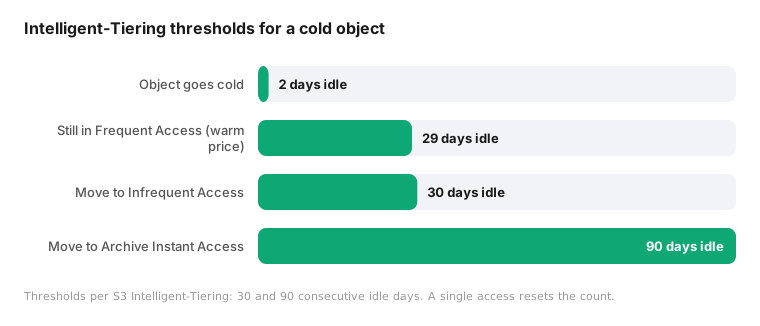
S3 Intelligent-Tiering costs have two parts most engineers underestimate: a 30-day wait before a cold object moves down a tier, and a monitoring fee you pay on every object whether it moves or not. Intelligent-Tiering waits 30 consecutive days with no access before it demotes an object from Frequent Access to Infrequent Access, and a single GET resets that counter to zero. An object that goes cold on day 2 keeps paying Standard pricing for the next 28 days. That is not a bug. It is the documented, deliberate design.
The default is reasonable. The 30-day window exists to prevent thrashing, and the point of the feature is that you enable it once and stop thinking about it. But once you understand the mechanics at the request and object level, you can see exactly where the money leaks and decide whether the leak is worth the convenience.
reCost data across more than 100 billion S3 requests per month shows that 63% of monitored objects go cold within 5 days of their last genuine read, yet keep paying the Frequent Access rate for 25 or more additional days because the calendar has not caught up. This post answers the questions engineers type into a search bar: how long before Intelligent-Tiering moves an object, whether a single GET resets tiering, what the monitoring fee costs, why your existing tools never flag the gap, and what the request data looks like when you can see every access instead of a monthly rollup.
How long before S3 Intelligent-Tiering moves an object?
Intelligent-Tiering does not sample or estimate. It tracks last-access time per object and applies two fixed thresholds:
- 30 consecutive days with no access moves an object from the Frequent Access tier to Infrequent Access.
- 90 consecutive days with no access moves it to Archive Instant Access, which is priced like Glacier Instant Retrieval.
The word carrying the weight is *consecutive*. The counter is not a decaying average or a rolling window. It is a simple streak.
Consider an object like `s3://analytics-prod/exports/2024/06/report-daily-0617.parquet`. It is written on the 17th, read heavily for two days by a dashboard job, then never touched again. Under Intelligent-Tiering that object pays Frequent Access (Standard) pricing through day 30, then drops to Infrequent Access. It was cold for 28 of those days and you paid the warm rate the entire time.
Does a single GET reset S3 Intelligent-Tiering?
Yes. A single GET resets the counter to zero. Any access, a single GET or a single HEAD that counts as a retrieval, restarts the streak. The object returns to the Frequent Access tier and the 30-day count begins again. Intelligent-Tiering cannot tell the difference between an object that is genuinely warm and one that gets a single stray read a month. It treats both identically: reset the clock, pay the warm rate.
What does the S3 Intelligent-Tiering monitoring fee cost?
Intelligent-Tiering charges $0.0025 per 1,000 objects per month for the tracking itself. You pay that fee whether or not any object ever moves. For a bucket of small objects the arithmetic turns hostile: objects under 128KB are never eligible for auto-tiering to the lower tiers, but you still pay to monitor them, and the monitoring fee exceeds any storage savings those objects could produce.
Why is the 30-day wait structural, not a tuning problem?
You cannot configure the 30-day window down. It is fixed, and there is a coherent reason inside the model Intelligent-Tiering uses.
Because the trigger is a streak counter with no learned notion of an object's normal rhythm, the only defense against thrashing is a long window. If the threshold were 3 days, an object read every Monday would ping-pong between tiers all month, and each move to Frequent Access on a read plus each demotion carries cost and, for the deeper tiers, a 30-day minimum storage duration. A short window on a dumb counter produces expensive churn.
So the 30-day default is the conservative choice given that the system knows nothing about the object beyond a single last-access timestamp. The limitation is the model, not the parameter.
Intelligent-Tiering vs lifecycle rules
Standard lifecycle rules solve a different problem. A lifecycle rule moves objects to Standard-IA or Glacier based on object age, counting days since creation, not days since last read. That works when access maps cleanly to age, such as logs you never read after 30 days. It fails when an old object is still read regularly, because the rule cannot see reads at all. Intelligent-Tiering fixes the read blindness by tracking last access, but pays for it with the monitoring fee and the fixed 30-day streak. Neither reacts to a per-object read rhythm, and neither excludes an object that went cold on day 2 from paying the warm rate through day 30.
Why doesn't my cost tooling show this?
The gap is invisible to most FinOps workflows because the tools operate on the wrong granularity.
The Cost and Usage Report tells you what you spent per storage tier per bucket per day. It shows that a bucket sits in Frequent Access. It does not tell you that most objects in that bucket went cold weeks ago and still pay the warm rate because their streaks keep getting reset by scanner traffic. CUR aggregates. The waste lives at the object level.
S3 Inventory gives you a daily manifest of objects, sizes, and storage classes. Useful, but it is a snapshot. It does not tell you *when* each object was last read, or how often. Two objects can look identical in Inventory while one is read hourly and the other has not been touched in a year.
CloudTrail data events would give you per-request visibility, at a price that makes it a non-starter here. Data events list at $0.10 per 100,000 events. At the volumes real data platforms generate, hundreds of billions of requests a month, that is roughly $100K per month just to observe the traffic. Nobody turns on full data-event logging to optimize storage tiers.
What does the request data actually show?
The signal you need is already being written, for free. S3 server access logs record one line per request: requester, operation, object key, request time, user-agent, response code, bytes transferred, and more. You pay only the S3 storage cost for the log objects themselves. Delivery is best-effort and can lag by hours, which is fine for tiering decisions.
From the vantage point of processing more than 100 billion S3 requests a month across many buckets, three patterns repeat.
The stray-read reset. An object goes cold, then a crawler, a backup verification job, or an `s3 sync` with no filter issues a single GET on day 25. In the access log this is one line, often with a distinctive user-agent, hitting a key that has otherwise been silent for three weeks. To Intelligent-Tiering that one line is indistinguishable from real demand. The streak resets. The object pays Standard for another 30 days.
The prefix that went idle. Dated prefixes are the classic case. `s3://events-raw/dt=2022-03-11/` gets written once, read hard for a week during backfill, then goes quiet. Months later the entire prefix is idle, but because objects get swept by an audit tool or a broad `ListObjects` followed by targeted GETs, the streaks stay short of 30 and the storage class never drops.
The per-object rhythm. An object read once a quarter should sit in a cold tier between reads, but Intelligent-Tiering yanks it back to Frequent Access on each quarterly touch, resetting 30 days each time. The per-object read rhythm is visible in the logs. The calendar cannot use it.
How do I detect cold objects from S3 access logs?
You can build a good chunk of this from parts you already have.
1. Turn on S3 server access logging on the buckets that matter. Budget for the log storage and nothing else.
2. Create an Athena table over the log prefix:
CREATE EXTERNAL TABLE s3_access_logs (
  bucket_owner STRING, bucket STRING, request_dt STRING,
  remote_ip STRING, requester STRING, request_id STRING,
  operation STRING, key STRING, request_uri STRING,
  http_status STRING, error_code STRING, bytes_sent STRING,
  object_size STRING, total_time STRING, turn_around_time STRING,
  referrer STRING, user_agent STRING, version_id STRING
)
ROW FORMAT SERDE 'org.apache.hadoop.hive.serde2.RegexSerDe'
WITH SERDEPROPERTIES (
  'input.regex' = '([^ ]*) ([^ ]*) \\[(.*?)\\] ([^ ]*) ([^ ]*) ([^ ]*) ([^ ]*) ([^ ]*) (\"[^\"]*\"|-) (-|[0-9]*) ([^ ]*) ([^ ]*) ([^ ]*) ([^ ]*) ([^ ]*) ([^ ]*) (\"[^\"]*\"|-) ([^ ]*)'
)
LOCATION 's3://your-log-bucket/access-logs/';
3. Compute the last genuine read per key, excluding scanners and your own tooling:
SELECT key, MAX(parse_datetime(request_dt, 'dd/MMM/yyyy:HH:mm:ss Z')) AS last_read
FROM s3_access_logs
WHERE operation IN ('REST.GET.OBJECT')
  AND http_status LIKE '2%'
  AND user_agent NOT LIKE '%aws-cli%'
  AND user_agent NOT LIKE '%Scanner%'
  AND requester <> 'arn:aws:iam::ACCOUNT:role/lifecycle-audit'
GROUP BY key;
4. Join that against S3 Inventory to get current storage class and size. Now you can see objects that are cold by the signal but still sitting in a warm class.
5. Drive lifecycle transitions or explicit `CopyObject` storage-class changes from the result, filtering out objects under 128KB where tiering economics never pay off.
The hard part is not the query. It is separating a real read from a scan, doing it continuously, and deciding when an object is genuinely warm again rather than momentarily touched. That is exactly the judgment a fixed calendar refuses to make.
What does reCost automate?
reCost's only inputs are the artifacts above: S3 server access logs for the access signal, S3 Inventory for the object census, and the Cost and Usage Report for the cost side. No CloudTrail data events, no agents, metadata only.
reCost Auto Tiering starts from the signal instead of the clock. It learns the access pattern of every object, bucket, and prefix individually rather than applying one global window to everything. When the genuine read signal for an object flatlines, the move happens in near real time, not 30 days later. It moves objects in both directions, but a single stray read does not bounce data back to Standard: the learned pattern decides when data is genuinely warm again, and one touch does not qualify. There is no per-object monitoring fee.
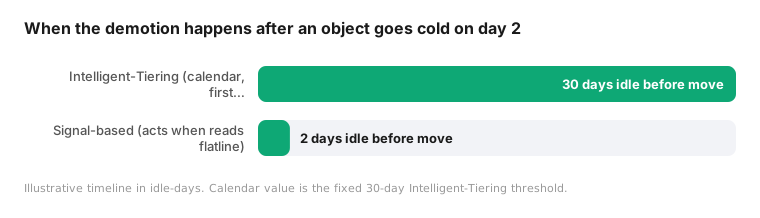
The difference is measurable across buckets:
| Metric | S3 Intelligent-Tiering | Signal-based tiering |
|---|---|---|
| Delay before a cold object moves | 30 consecutive no-access days | near real time on signal flatline |
| Effect of a single stray GET | resets the 30-day streak | learned pattern decides warmth |
| Per-object monitoring fee | $0.0025 per 1,000 objects/month | none |
| Objects under 128KB | monitored, never auto-tiered down | excluded from moves |
Takeaway
Intelligent-Tiering is not wrong. It is conservative by construction, because a streak counter with a single timestamp has no other safe move. The cost of that conservatism is 28 days of warm pricing on objects that went cold on day 2, plus a reset every time a scanner brushes past. The access signal that would fix it is already being written to your log bucket for free. The question is whether you act on the signal or keep paying for the wait.
FAQ
How long does S3 Intelligent-Tiering wait before moving an object? 30 consecutive days with no access moves an object to Infrequent Access, and 90 consecutive days with no access moves it to Archive Instant Access.
Does a single GET reset S3 Intelligent-Tiering? Yes. A single GET or a qualifying HEAD resets the counter to zero and returns the object to the Frequent Access tier.
What is the S3 Intelligent-Tiering monitoring fee? $0.0025 per 1,000 objects per month, charged whether or not any object ever moves tiers.
Do small objects benefit from Intelligent-Tiering? No. Objects under 128KB are never auto-tiered to lower tiers, yet you still pay the monitoring fee on them.
Connect reCost to your S3 environment in 5 minutes
No agents, no code changes. Just your S3 access logs and a complete picture of your data lake health.
Book a Demo